Counting down to Japan

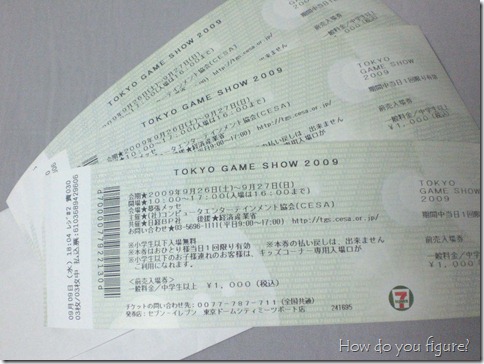
With a little over a week left until I leave for Japan, everything is falling in place. I got an email a few days ago from my travel companion with the following picture attached:

TGS tickets!

Thanks to his friend in Tokyo, we have our tickets for Tokyo Game Show 2009, which opens to the public on Saturday! I’m a bit sad that I won’t be able to make it there for the industry keynotes, but the public exhibition should still be awesome with all sorts of interesting characters showing up. I wonder if I can sneak myself into the Microsoft booth using my badge… ^.^;;

Our itinerary for the week has pretty much been nailed down as well, with only a few loose ends to work on. Here’s a rough outline:

  • Thursday – Depart United States, land Friday late afternoon JST. Go to hotel and crash.
  • Saturday – Tokyo Game Show
  • Sunday – Harajuku
  • Monday – Lunch with some Microsoft Japan folks, exploring Tokyo
  • Tuesday – Akihabara
  • Wednesday – Saitama for Washinomiya Shrine, Do As Infinity concert (hopefully)
  • Thursday – Ghibli Museum
  • Friday – Train to Kyoto in AM, do sightseeing
  • Saturday – More sightseeing in Kyoto
  • Sunday – Train to Narita and return to US
  • Monday – Taking day off from work to recover

It’s going to be a very packed trip, I think, and I’m getting pretty psyched about it. With our hotels booked and itinerary made, all that’s really left for me to do is pack and get on the plane next week!

Buying figures on eBay (with Bing Cashback)

Since older items are hard to find in normal retail channels, I’ve had to resort to using eBay for quite a few of my purchases over the past year. Most recently, Naru, Naru, and Mikuru came from eBay, as had Konata and Rin Figma, Lena Sayers, and a whole mess of others. There are a lot of things to be cautious of when buying from an auction site, as it can be difficult to ensure you’re getting a new and authentic product. There are plenty of rules of thumb out there (including the age-old “if it’s too good to be true, it probably is” adage), though once you do find something you want to buy, why not try to save a little extra?

Last year, Microsoft launched a shopping and price comparison site, along the same lines as Froogle. Initially called Live Shopping (and now branded as Bing Shopping), the site offered incentives for purchasing in the form of rebates. The rebate would be a percentage of an item’s purchase price and would be delivered to you 60 days after purchase. Lots of popular retailers joined this program, from Newegg to Barnes and Noble. The amount ranged from as little as 1% all the way up to 50% in rare cases, usually during a promotional period.


One of the retailers offering incentives is eBay. Unlike most other stores in the Cashback program, eBay isn’t accessible through the main landing page. Instead, it was triggered by specific searches in Live. The amount also tended to fluctuate, depending on if there was a promotion going on. It is currently at 8%, however it has also been as high as 35%. Since not too many people in the figure community seem to be aware of the program, here’s a quick guide on how to take advantage and save a little bit in the process!

Continue reading “Buying figures on eBay (with Bing Cashback)”

August loot

Even though I’m going to be going to Japan next month, I couldn’t help myself and picked up a few gems from eBay. Last year, I’d discovered the wonders that was Live Cashback (now Bing Cashback) and found it an economical way of buying figures. If you’re not aware of how Cashback works, here’s a quick tutorial:

  1. Microsoft has teamed up with various internet merchants to offer rebates on products purchased via the Bing landing page. There are a few ways of discovering what stores are available, and a mostly complete listing is available at http://cashback.bing.com.
  2. As an alternative to the Cashback page, searching on bing.com will also net links. eBay, for example, works in this manner. By doing searches on strings like xbox, a link will often appear telling you what percentage you can get.
  3. Cashback on eBay is only valid on Buy it Now items and must be paid for using PayPal. Shipping charges don’t qualify for Cashback.
  4. Most eBay purchases now give you the rebate immediately after purchase in the form of PayPal credit. Most retailers require a 60 day waiting period before it is deposited.

At present, Bing Cashback for eBay is at 8%. Last week, it was at 10% and was at 16% a few weeks prior. Last year, it was as high as 35% (guess how much stuff I bought at that time…. >.<)

Enough plugging, on to the goods!

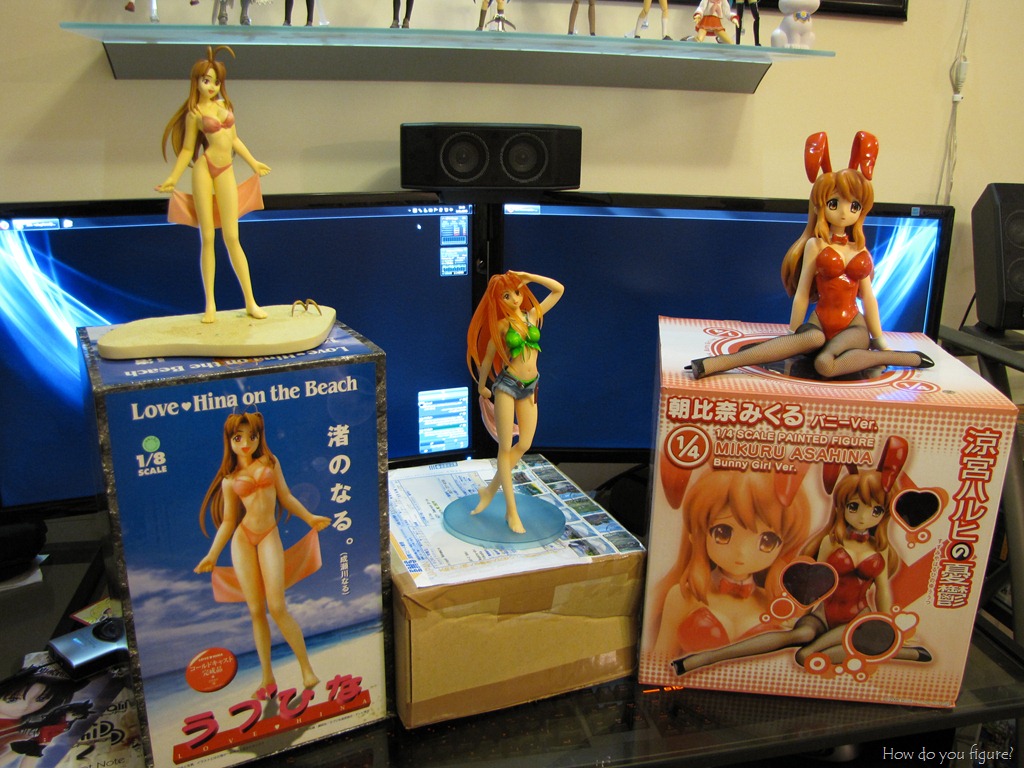
Loot!I went a bit crazy this week and picked up a few beauties. I’d been eyeing the Mikuru bunny for some time now, and finally decided to jump on getting one. I’d also been searching for the Max Factory Naru after seeing several reviews raving about her beauty. Unfortunately, the same search that found me that Naru also got me to an auction for the EPOCH Naru statue. For the price, I just couldn’t pass her up and put in a bid.

Continue reading “August loot”

A few computer upgrades

It’s been a big week for figure acquisitions and computer parts! To take stock, here are just a few things that arrived…

1/4 scale Mikuru Bunny by FREEing

1/8 scale Narusegawa Naru by EPOCH

1.5TB Seagate Barracuda Hard drive

300GB Western Digital VelociRaptor

I’m still waiting on a few things, including some wireless networking equipment (finally taking the plunge and upgrading things to N) as well as this little gem. Most of the latter half of the week involved rebuilding my computer and setting up the new equipment. Photos of figures will be forthcoming, once I get in that last item.

My first order of business was to install the 1.5TB drive into my home server. It replaced one of the existing 750GB drives, bringing total storage spaces to 4.78TB:
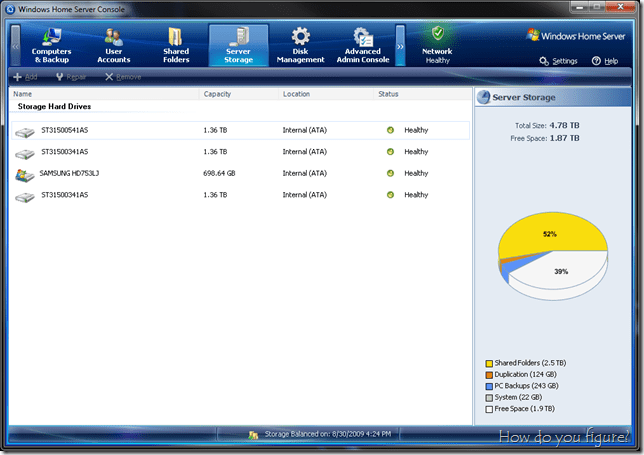
WHS

The slight upgrade leaves me with a bit more space to store DVDs, and also frees up a drive for use in my main machine. At some point, I’ll be replacing the last 750GB drive, though I’ll likely wait for prices to drop on the 2TB drives prior to making that move. It may also let me wait until the next version of WHS is released as replacing that drive will require a server rebuild.

With the spare 750GB drive in hand, I set on my next series of upgrades. Up until now, Chikane was the last machine I had that wasn’t running the Windows 7 RTM bits. While the post-RC build was mostly fine (build 7201), it was time for me to move forward. In anticipation of the upgrade, I’d also replaced the video card with something that is still supported by ATi. Now sporting a Radeon HD4830, Chikane was ready to rock and roll.

To complete the upgrades, I went ahead and installed both the 750GB Samsung drive and the VelociRaptor. Since I already had an equivalent 750GB drive in the system already, I placed the two in a RAID0 array for a bit extra performance. The OS and programs, however, would be handled by the VelociRaptor.

Performance rating

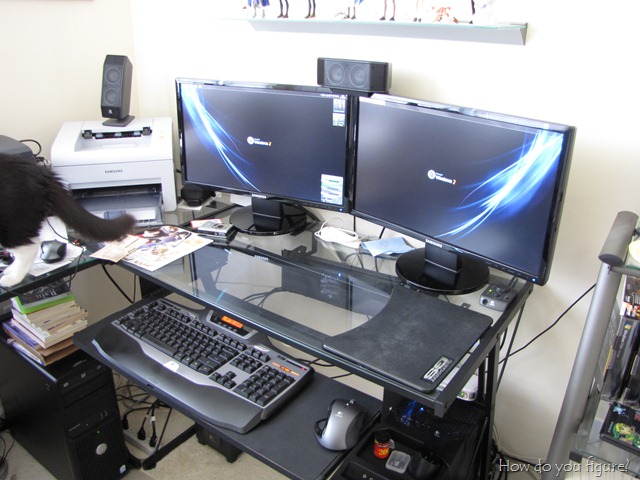
Sadly, even though the VelociRaptor is a 10kRPM drive, it’s still the bottleneck in my system. I just can’t win! Finally, however, I come to the capstone of my upgrades for the week. Thanks to my friends at Costco, I now have a pair of Samsung SyncMaster 2343BWX LCD monitors!

Lots of desktop real space

It turns out that my local store was clearing these screens out. I grabbed the last new display and the display model for $175 each. I’ll have to say though, when I first got them hooked up, it took some getting used to. I was actually feeling a bit motion sick from having to move my head around to see everything. Now that I’ve resituated my sitting position and had some time to adjust, it’s actually pretty natural. I’m just wondering how I can go back to such little real estate at work tomorrow…

Desktop wallpaper was found here. I’d also modified it to have a mirror image on the other screen, giving a nice symmetric effect.

Planning a trip to Japan – Part 2

Just as a quick update to my last entry about Japan, I now have confirmed dates and have booked my plane tickets! I’ll be leaving Charlotte on September 24 (arriving on the 25) and leaving October 4. Now that my airfare has been booked, it’s really going to happen! All that is left is to find a hotel, plan an itinerary, and pack.

…now, which camera equipment should I take, and should I bring a Figma along…

Planning a trip to Japan

Guide books!

After a couple years of saying that I was going to go to Japan, it looks like I’m finally going to do it this year! I’m still working on finalizing dates and details, but it looks like I’ll finally be able to go next month. I’m very excited about this and picked up a couple of guide books to help plan my itinerary…

At this point, there are a few things that I’m looking forward to seeing. For now, the trip coincides with the dates for Tokyo Game Show, so I’m going to be hitting up the show floor at least one of the two days. Also on the agenda is a trip into Harajuku on Sunday, a possible side trip into Kyoto for sightseeing, and Saitama to visit the Washinomiya Shrine. Of course, no trip for any otaku would be complete without at least one trip to Akihabara!

Lastly, I found out this week that Do As Infinity will be releasing their first new album in three years while I’m there. After a little searching, I found out that the NHK is hosting an outdoor live event to help promote the new album, so I’m going to try to get tickets to the show!

I’m extremely excited about this trip, though I’m probably going to wind up completely broke when the dust settles…

More Photosynth action

After some success at creating a Photosynth of upstairs area, I decided to try my hand and doing figures again. With the newly installed flooring downstairs, I think I’d created the perfect backdrop for good synthing potential. First up, a quick reminder of what Photosynth is. It was created out of the research done at Microsoft Research as a method to use information from photos to generate a virtual environment. In essence, it is a tool to facilitate “photo tourism.” From photosynth.net:

What is Photosynth?

Photosynth creates an amazing new experience with nothing more than a bunch of photos. Creating a synth allows you to share the places and things you love using the cinematic quality of a movie, the control of a video game, and the mind-blowing detail of the real world.

How Does it Work?

In simple terms, Photosynth allows you to take a bunch of photos of the same scene or object and automagically stitch them all together into one big interactive 3D viewing experience that you can share with anyone on the web.

Photosynth is a potent mixture of two independent breakthroughs: the ability to reconstruct the scene or object from a bunch of flat photographs, and the technology to bring that experience to virtually anyone over the Internet.

Using techniques from the field of computer vision, Photosynth examines images for similarities to each other and uses that information to estimate the shape of the subject and the vantage point each photo was taken from. With this information, we recreate the space and use it as a canvas to display and navigate through the photos.

Providing that experience requires viewing a LOT of data though—much more than you generally get at any one time by surfing someone’s photo album on the web. That’s where our Seadragon™ technology comes in: delivering just the pixels you need, exactly when you need them. It allows you to browse through dozens of 5, 10, or 100(!) megapixel photos effortlessly, without fiddling with a bunch of thumbnails and waiting around for everything to load.

We deliver this immersive viewing experience to users on multiple operating systems by tapping into the power of Silverlight, Microsoft’s rich web application technology.

Without further ado, a few synths I’d recently created. First up, the synth I’d done last week showing off my upstairs area. There’s quite a bit to explore here, from the keyboard on my desk to the shelf of manga and DVDs. Unfortunately, I didn’t do too much in terms of closeups with the figure displays, something I may revisit in the future. Click the image to view the synth!

room

My first attempt tonight featured working with a recent acquisition, 1/6 scale Yoko Littner by Kotobukiya. This is the first time I tried using the floor as a background and am very encouraged by the results. In addition to the floor, I also grabbed a wood cutting board to provide more background complexity…

yoko

My second attempt tonight featured Dollfie Rin. I achieved slightly better results with this synth (100% synthy) since I didn’t try to do any odd-angled close ups. I will probably revisit this one later to do some more close up detail shots for a better “tour.”

rin

In addition to these, I had done quite a few others in the past (with varying success). Check the rest of them out here. I’ll continue to do other figures and may expand on to doing some scenes. Such a cool little tool, isn’t it?

Otacool!

Recently, Danny had partnered up with Japanese figure maker Kotobukiya to gather information about otaku from around the world. This information, along with pictures of the various otaku rooms would be published later this year in a book called OTACOOL – Worldwide Otaku Rooms. To kick things off, he’d asked the winning entrants from his “My Room” contest to upload higher resolution photos to his new figure.fm site. From the initial sets, images would be chosen for the cover of the book. Presently, here’s what the cover for the book looks like:

821a15941ba1e752b142be40c753d035

If it stays that way, then I’ll have made the cover! The top left image is a shot of the lounge, complete with cat! As cool as it is, I would have preferred that they used a different image, I’m particularly fond of the nigh time shots, which show the display cases all lit up. It seems that Danny is partial to those pictures too, as one of them wound up being used in the banner for the Otacool portal.

Continue reading “Otacool!”

Display case upgrade

IMG_3969

The recent Dollfie acquisition caused me to think about the best way to display and protect my new daughter. As a result, I trekked up to IKEA over the weekend and got two more DETOLF display cabinets and light sets. Since I knew Rin would be too tall to stand in on one shelf, I decided the logical course of action would be to remove one shelf and give her half the cabinet to herself. Worked out pretty well, if I do say so myself…

Continue reading “Display case upgrade”

Dollfie head cap and stand

Got my second package from VolksUSA in today. The stand and head cap that I’d ordered came in! The Japanese really do love their packaging, as the stand came in quite the large box…

Big box for flat stand

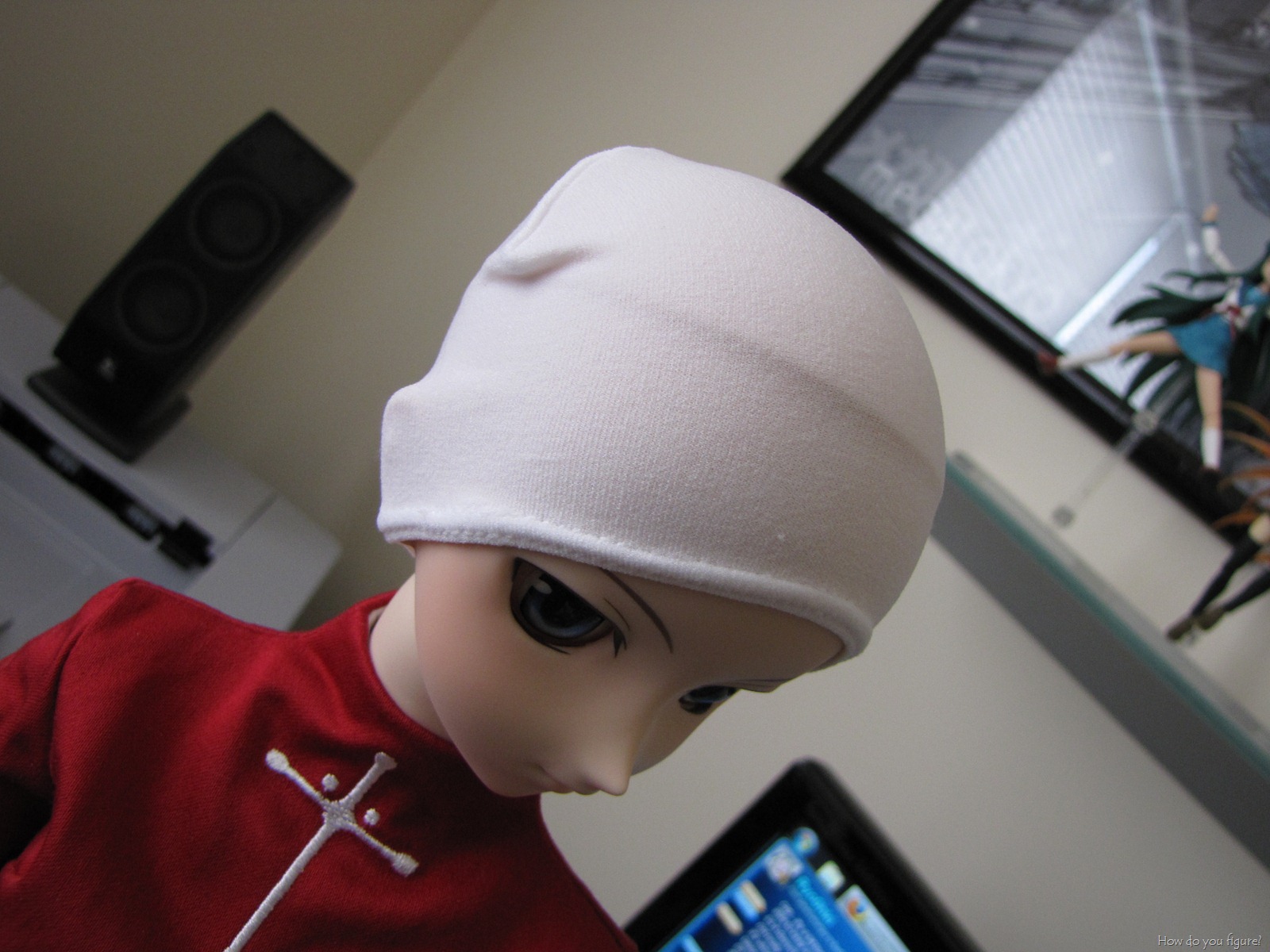
I assembled the stand first, just so I’d have a way to work with Rin while trying to get the wig and cap on. Immediately, there was a bit of a problem. The cap itself seemed a bit too large for her head and didn’t look like it fit.

Looks warm, but too big?

If that were supposed to be the only thing she wore, it’d probably be fine. It looks pretty warm and would keep her ears safe from cold winter temperatures or give her nicer hydrodynamics if she were swimming. Sadly, neither of those scenarios fit, so I needed to figure out how to make it work. I tried a couple ideas, from folding it to rolling it up and tucking underneath, but nothing seemed to work. I finally gave in and shot an email to the VolksUSA folks with the picture attached and waited for a response.

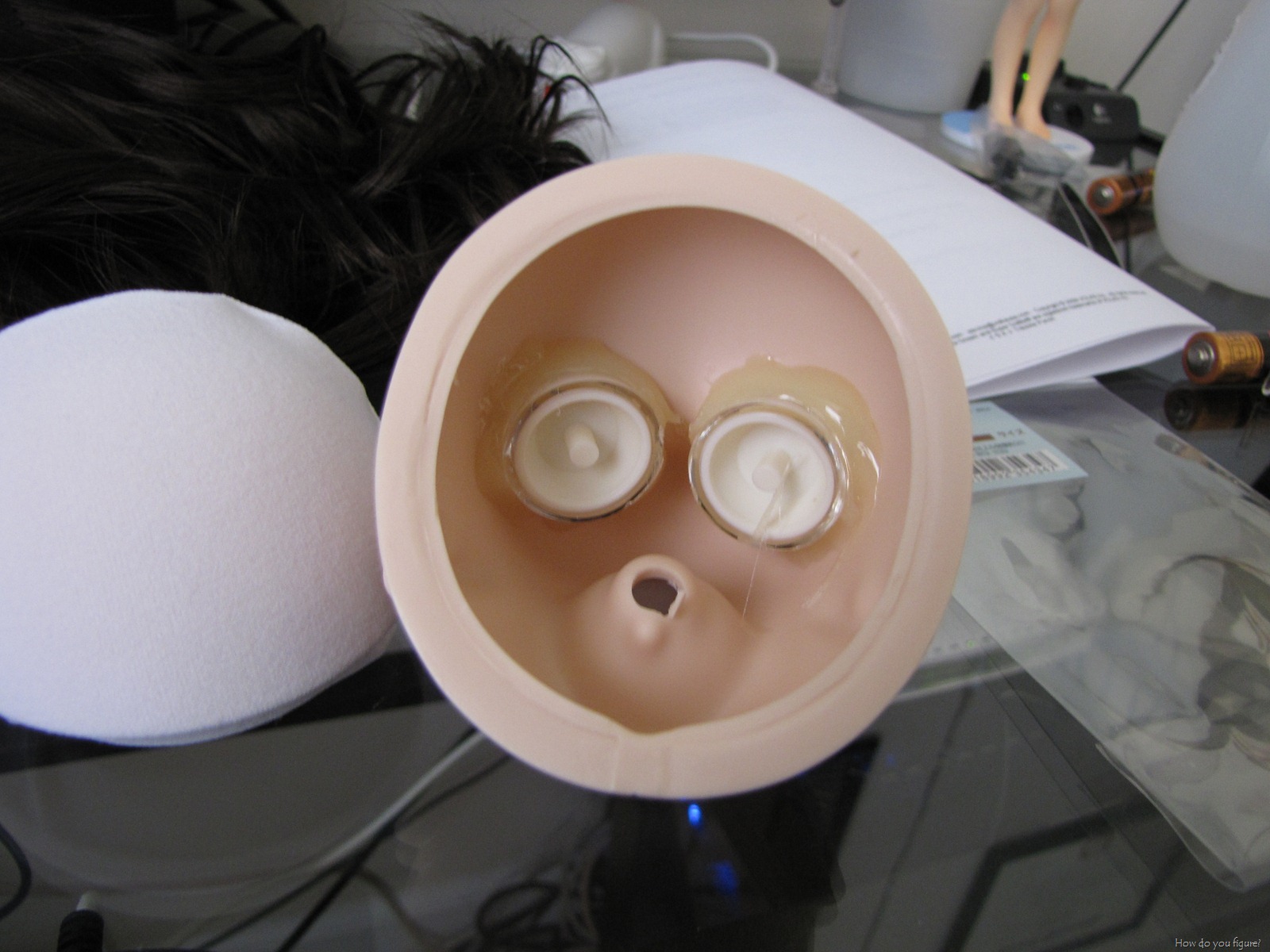
Keen to keep trying, I started searching and found an entry on the VolksUSA blog. While it didn’t directly talk about how the head cap went on, it did inspire me to remove the top piece of her head and try the fit that way. That seemed to work and gave me a chance to peek inside Rin’s head…

IMG_3949

Once the top was put back on, I set to work in fitting the wig. it’s a bit tighter than before, but results came out well. Rin seems to be happy with it too!

IMG_3950

Before and after:

IMG_3945IMG_3952

Shortly after I’d finished, I received a reply from Volks. Seems the method I used isn’t the “right” way, and they included directions. I’ll include them here for other owners who may struggle with the same problem…

1&2: Place the headcap on the head. It will be slightly loose up at the top. Make sure that it rests behind the ears.

3: When you put on the wig, hold it down in the front with your thumb, and pull down on the back with your other hand, slipping it down over the headcap and head. After you do this the headcap will show a little bit outside the wig.

4: You can use you fingers to gently push the headcap inside the hairline. But be careful. Don’t push it up too high or the wig will touch her head. The line of the headcap, and wig cap should match up as perfectly as possible.

UPDATE: Just redid the cap as per the Volks instructions. Works great!

UPDATE2: Volks had asked that I remove the pictures. They didn’t say anything about the text though. 🙂